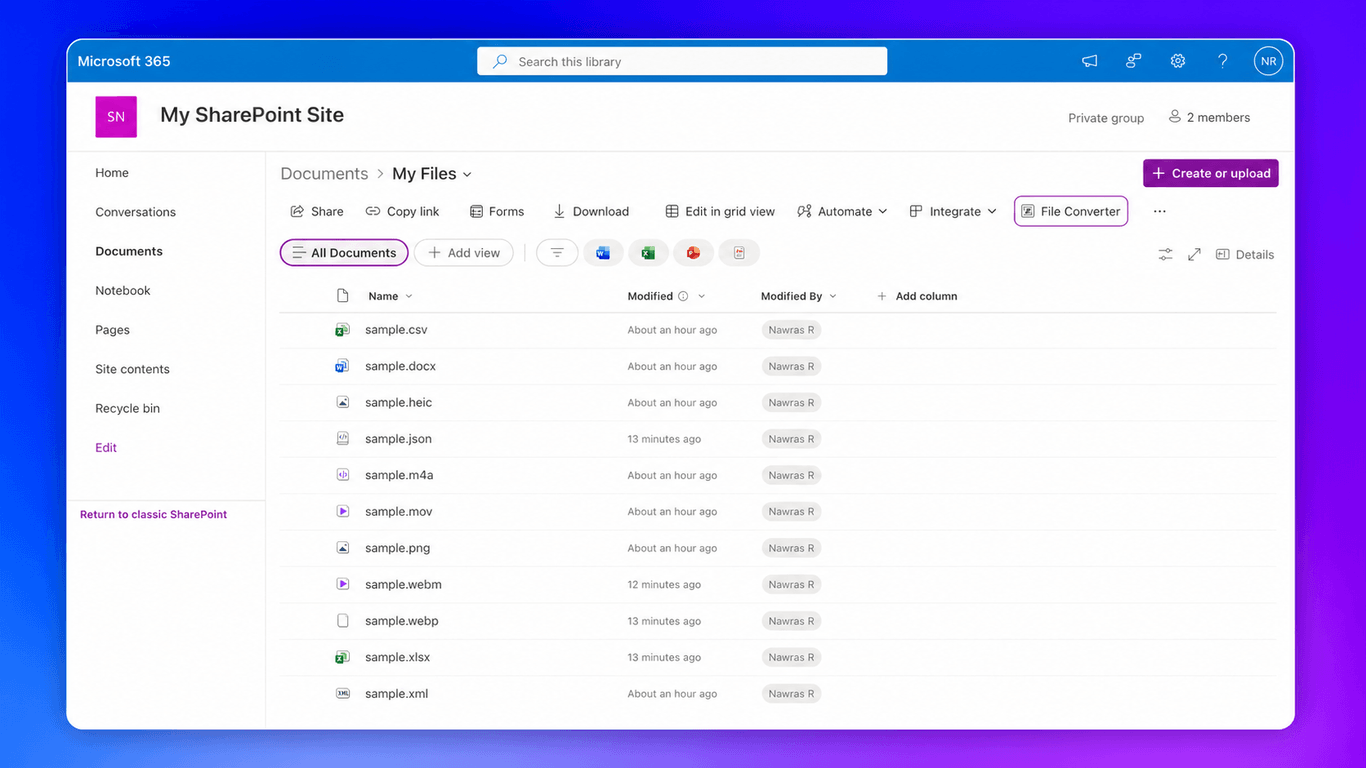
Convert files between formats directly in SharePoint. Images, documents, spreadsheets, video, and audio. Select a file, pick a format, and get the result in seconds. No downloads or external tools needed.
Converting files stored in SharePoint is a hassle. Download the file, find a converter website, upload it there, wait for the conversion, download the result, and upload it back to SharePoint. For a single file, it's annoying. For a team doing it regularly, it's a productivity drain.
File Converter for SharePoint eliminates all of that. Select a file in your document library, click Convert, choose the target format, and the converted file appears right in SharePoint. Images, documents, spreadsheets, video, and audio — all handled without leaving your browser.
Select a file and the add-in shows you all available target formats. Conversions run in your browser — files are never sent to an external server.
| Source | Converts to |
|---|---|
| PNG | JPG, WebP, BMP, GIF, SVG, TIFF, AVIF, Base64 |
| JPEG | PNG, WebP, BMP, GIF, SVG, TIFF, AVIF, Base64, DOCX |
| WebP | JPG, PNG, BMP, GIF, SVG, TIFF, AVIF, Base64 |
| SVG | JPG, PNG, WebP, BMP, GIF, TIFF, AVIF, Base64 |
| HEIC | JPG, PNG, WebP, BMP, GIF, SVG, TIFF, AVIF, Base64 |
| BMP | JPG, PNG, WebP, GIF, SVG, TIFF, AVIF, Base64 |
| GIF | JPG, PNG, WebP, BMP, SVG, TIFF, AVIF, Base64, MP4 |
| TIFF | JPG, PNG, WebP, BMP, GIF, SVG, AVIF, Base64 |
| AVIF | JPG, PNG, WebP, BMP, GIF, SVG, TIFF, Base64 |
| Base64 | PNG, JPG, WebP, GIF, BMP, SVG, TIFF, AVIF |
| Source | Converts to |
|---|---|
| DOCX | HTML, JPG |
| Source | Converts to |
|---|---|
| XLSX | CSV, TSV, JSON, HTML |
| XLS | XLSX, CSV, TSV, JSON, HTML |
| CSV | XLSX, TSV, JSON, HTML |
| TSV | XLSX, CSV, JSON, HTML |
| ODS | XLSX, CSV, TSV, JSON, HTML |
| JSON | CSV, HTML, XML |
| XML | JSON |
| Source | Converts to |
|---|---|
| MP4 | WebM, MOV, MKV, AVI, MP3, WAV, OGG |
| MOV | MP4, WebM, MKV, AVI, MP3, WAV, OGG |
| MKV | MP4, WebM, MOV, AVI, MP3, WAV, OGG |
| AVI | MP4, WebM, MOV, MKV, MP3, WAV, OGG |
| WebM | MP4, MOV, MKV, AVI, MP3, WAV, OGG |
| Source | Converts to |
|---|---|
| MP3 | WAV, OGG, FLAC, AAC, M4A, Opus |
| M4A | MP3, WAV, OGG, FLAC, AAC, Opus |
| WAV | MP3, OGG, FLAC, AAC, M4A, Opus |
| FLAC | MP3, WAV, OGG, AAC, M4A, Opus |
| OGG | MP3, WAV, FLAC, AAC, M4A, Opus |
| AAC | MP3, WAV, OGG, FLAC, M4A, Opus |
| Opus | MP3, WAV, OGG, FLAC, AAC, M4A |
Need a format that's not listed? Let us know and we'll add it for you.
Select any supported file in your SharePoint document library and the Convert button appears in the toolbar. One click opens the conversion dialog.
All conversions run locally in your browser. Files are never uploaded to an external server. Your data stays in SharePoint and on your device.
Save the converted file to the current folder, browse to a different SharePoint folder, or download it directly to your computer. You choose where the result goes.
Navigate your SharePoint folder structure from within the conversion dialog. Pick any folder in your site as the destination without switching tabs or windows.
See real-time progress as your file is downloaded, converted, and uploaded. Know exactly what's happening at each step of the conversion process.
If a file with the same name already exists in the destination folder, the add-in detects the conflict and lets you choose a new name before saving.
Click on any supported file in your SharePoint document library. The Convert button appears in the toolbar.
Click Convert and pick your target format from the list. The add-in only shows formats that are compatible with your selected file.
Save the converted file to the current folder, browse to a different folder in SharePoint, or download it to your computer.
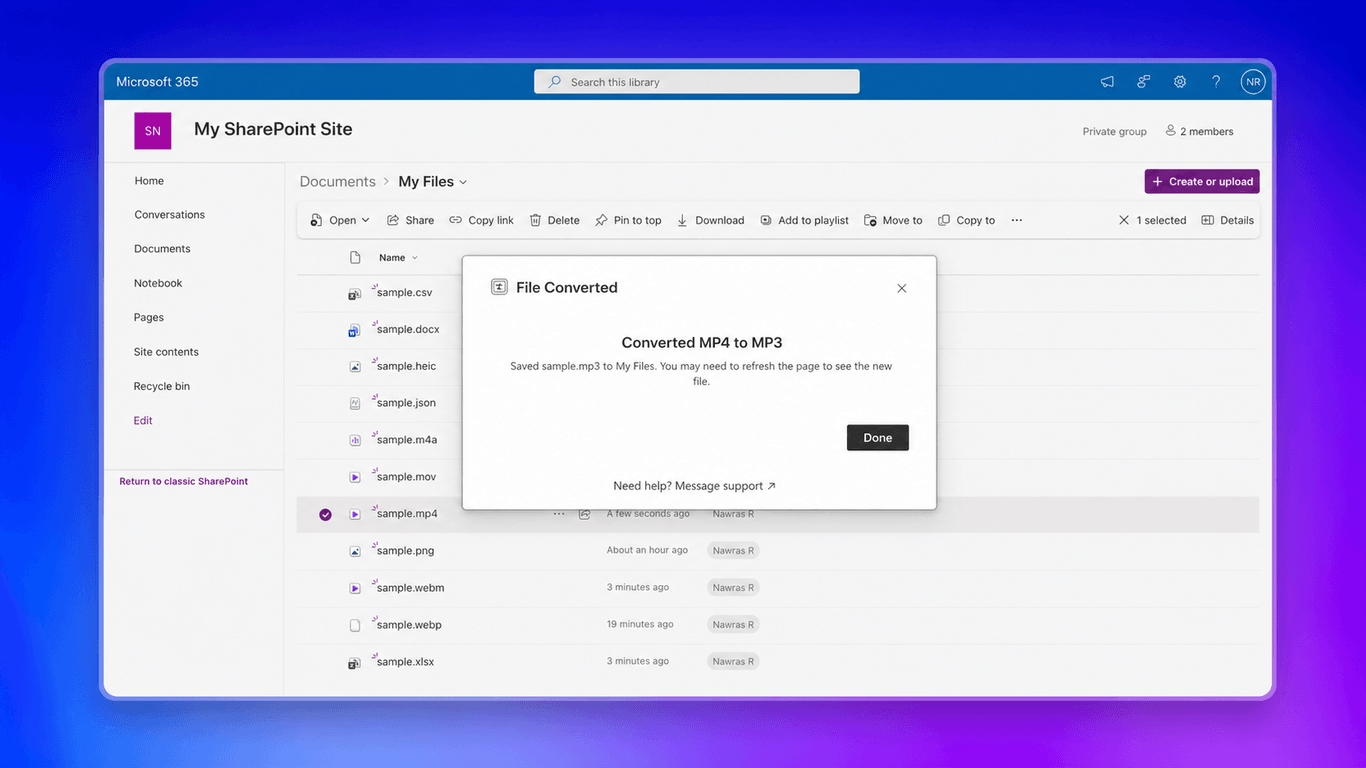
The conversion runs and your file appears in the chosen destination. A confirmation dialog shows you the result with a link to the converted file.
SharePoint teams that receive files in mixed formats and need to standardize them. Convert incoming images, documents, and spreadsheets without leaving SharePoint.
Marketing and design teams managing image assets in SharePoint. Convert between PNG, JPG, WebP, and other formats to meet the requirements of different channels and platforms.
Finance and operations teams working with spreadsheet data. Convert between XLSX, CSV, and XLS for data imports, exports, and integrations with line-of-business systems.
IT administrators looking to reduce shadow IT. Give users a sanctioned tool for file conversion that works inside SharePoint instead of sending files to unknown websites.
Images: PNG, JPG, WebP, SVG, HEIC, BMP, GIF, TIFF, AVIF, and Base64. Documents: DOCX. Spreadsheets: XLSX, CSV, XLS, TSV, ODS, JSON, and XML. Video: MP4, MOV, MKV, AVI, and WebM. Audio: MP3, M4A, WAV, FLAC, OGG, AAC, and Opus. The add-in shows you which target formats are available for each file type.
Yes. File Converter for SharePoint is a SharePoint Framework extension that runs in SharePoint Online. It works in any modern document library.
Conversions run in your browser. Files are not sent to any external server. The add-in downloads the file from SharePoint, converts it locally, and uploads the result back to SharePoint.
Yes. The conversion dialog includes a folder browser that lets you navigate your SharePoint site structure and pick any folder as the destination. You can also download the file directly to your computer.
The add-in detects the naming conflict and prompts you to choose a new filename before saving. Your existing files are never overwritten without your knowledge.
All plans come with a 60-day full refund guarantee ยท Cancel anytime from your dashboard, no questions asked. If you're not satisfied, contact us for a full refund.
Install File Converter for SharePoint and start converting files directly in your document library.